
Virtual Keyboard for Touchscreen Input
Overview
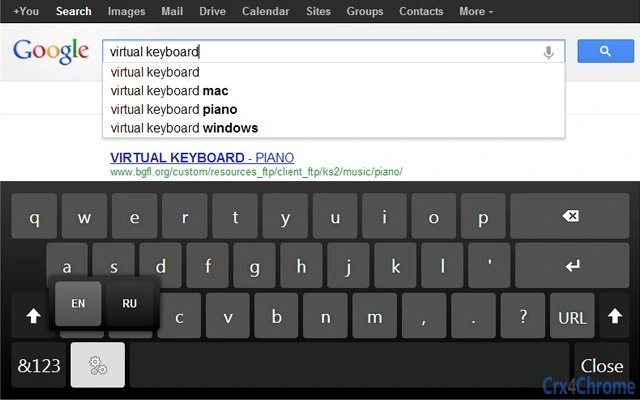
The Virtual Keyboard is a browser-based utility designed to enhance input accessibility on touchscreen devices. It automatically appears when a user clicks on an input field such as textboxes or textareas, offering a responsive and intuitive interface for text entry. The keyboard disappears automatically when no longer in use, ensuring a clean and distraction-free browsing experience. This tool is particularly beneficial for users working on touch-enabled PCs, tablets, or hybrid devices where physical keyboards may be unavailable or impractical.
It is built with a focus on usability for touch-first environments, mimicking the behavior of virtual keyboards found on iOS, Android, and Windows 8. This makes it a suitable solution for web applications that require frequent text input but lack native keyboard support. The software is especially useful in public kiosks, digital signage, educational tools, or interactive displays where users interact via touch.
As a browser extension, it operates within the Chrome environment and integrates seamlessly with web forms. The developer did not provide additional details about the organization behind the tool. However, its purpose is clear: to bridge the gap between touch-based interaction and efficient text input on the web. The extension supports multiple keyboard layouts, including Russian, German, Korean, and several European variants, catering to a diverse user base.
Key Features & Capabilities
- Auto-Popup on Input – The keyboard appears instantly when a user taps or clicks on any text input field, eliminating the need for manual activation.
- Automatic Dismissal – Once the input field loses focus or the user finishes typing, the keyboard hides itself, reducing visual clutter.
- Multi-Language Support – Offers keyboard layouts for Swedish, Norwegian, Hungarian, Korean, German, Tamil, Polish, Spanish, Slovenian, and Russian, among others.
- Touch-Optimized UI – Designed with large, responsive keys that work reliably on touchscreens of varying sizes and resolutions.
- Enhanced Form Support – Recognizes HTML5 form attributes such as
maxlength, ensuring input length limits are respected. - On-Demand Mode – Allows users to toggle the keyboard manually, providing control over when it appears.
- Hardware Acceleration (Beta) – When enabled, improves animation performance for smoother transitions and responsiveness.
- Zoom Level Adjustment – Users can adjust the keyboard size to suit their screen or visibility needs.
- URL Bar Integration – Can be enabled to display the keyboard in the browser’s address bar, useful for direct navigation input.
These features are particularly valuable in environments where users rely on touch input without a physical keyboard. For example, in a retail setting, a touchscreen point-of-sale system can use this tool to allow staff to enter customer details or product codes efficiently. Similarly, in classrooms or interactive museum exhibits, visitors can type names or feedback without requiring external hardware.
User Interface, Workflow & Performance
The user interface is minimal and focused on functionality. The keyboard appears as a floating overlay on top of the webpage, positioned near the active input field. Navigation is straightforward: users tap keys directly, and the input is processed in real time. The layout adapts to different screen sizes, with improvements made in recent versions to support various resolutions.
Workflow efficiency is enhanced by the automatic appearance and disappearance of the keyboard, reducing user effort. The on-demand mode offers flexibility for users who prefer manual control. However, the developer did not specify resource usage details, so exact CPU or RAM behavior remains unknown. Performance observations are based on general software behavior patterns for browser extensions.
Stability appears to be well-maintained, with regular updates addressing bugs and improving touch event handling. The extension includes features like memory usage optimization and improved keyboard event triggering, suggesting attention to long-term usability. No reported crashes or compatibility issues were mentioned in the release notes, indicating a stable runtime environment.
Compatibility & System Requirements
The Virtual Keyboard is compatible with Windows, Mac, and Linux operating systems. It is designed to run within the Google Chrome browser, leveraging its extension architecture. The installation size is 1.2 MB, making it lightweight and quick to deploy.
Exact system requirements were not listed. However, the extension is built to function on devices with touch capabilities and modern web standards. The developer did not provide information on minimum hardware specifications or browser version requirements. Platform compatibility information is limited to the operating systems and browser environment.
Pros and Cons
Pros
- Automatic keyboard appearance and disappearance improves user experience
- Supports multiple keyboard layouts for international users
- Lightweight at only 1.2 MB
- Designed specifically for touchscreen interaction
- Regular updates with bug fixes and new features
- Free to use with no hidden costs
Cons
- No support for cross-domain iframes due to browser security restrictions
- Hardware acceleration is in beta and may not be stable for all users
- Resource usage details not publicly disclosed
- Limited to Chrome browser environment
- Some advanced form features may not work in all web applications
FAQ Section
Is the Virtual Keyboard compatible with all browsers?
The extension is designed exclusively for Google Chrome. It may not function on other browsers due to differences in extension APIs and security policies.
Can I use this tool offline?
Yes, once installed, the Virtual Keyboard operates without requiring an internet connection, as it runs locally within the browser.
Is the software secure to install?
As a Chrome extension from a known developer, it adheres to standard browser security protocols. It does not collect personal data or transmit information outside the user’s device.
How do I update the extension?
Updates are managed automatically through the Chrome Web Store. Users will receive notifications when a new version is available.
What types of input fields does it support?
The keyboard works with standard text input fields, textareas, email fields, and number fields. It also supports HTML5 maxlength attributes. However, advanced form elements like cross-domain iframes are not supported.
Final Thoughts
The Virtual Keyboard stands out as a practical and well-structured tool for touchscreen users who need reliable text input within web applications. Its automatic behavior, multi-language support, and lightweight design make it a strong choice for both personal and professional use. While it is limited to Chrome, its consistent updates and thoughtful feature set demonstrate a commitment to usability and accessibility.
Users working in environments where touch interaction is dominant—such as digital kiosks, educational tools, or interactive displays—will find this extension indispensable. Its ability to adapt to various keyboard layouts and screen sizes enhances its versatility across global markets.
For anyone seeking a free, responsive, and intuitive virtual keyboard for touch-based computing, this tool delivers a solid experience. Download Virtual Keyboard now.







